
LEADTOOLS JPEG2000 COM Object Documentation
The LEADTOOLS JPEG2000 COM
Object extends web browsers that support ActiveX controls (Internet Explorer)
to include JPEG2000 support. JPEG2000 images have numerous benefits over
other natively supported image formats to include higher compression ratios
while maintaining superior quality, multiple resolution support to save on
bandwidth, and much more.
The LEADTOOLS JPEG2000
COM Object is available as part of the LEADTOOLS JPEG2000 Plug-in to LEADTOOLS Raster Imaging Pro
or higher. For details on purchasing this product, contact
sales@LEADTOOLS.com
The features
of the LEADTOOLS JPEG2000 COM Object include:
- Small size (only 800KB, about
500KB download size) and has no other file dependencies.
- Can load image files from
local paths, FTP, or HTTP.
- Supports caching.
- Navigation between different
levels (layers) of the JPEG2000 image.
- Provides UI Panning as well
as programmatic scrolling.
- Provides UI Zooming as well as programmatic scaleing.
-
When zooming, if the zoom factor creates a
display size that requires another level, then the next level is automatically
downloaded.
- Status reporting.
- Progress reporting.
- Different display modes (Fit,
Normal, AutoSize, Max).
- Progressive loading (Paint-While-Load).
- Download abortion.
- Context menu.
- Keyboard shortcuts.
The LEADTOOLS
JPEG2000 COM Object contains the following Methods, Properties, and Events:
Properties:
|
Name
|
Type
|
Description |
||||
|
Appearance |
APPEARANCE_TYPE |
The control appearance.
Possible values are:
|
||||
|
VARIANT_BOOL |
If set to TRUE, forces
a reload when changing relevant properties. Relevant properties are:
Level
property, You can set this property
to FALSE before changing one or more of the relevant properties, then
set it back to TRUE to force an update. |
|||||
|
BackColor |
OLE_COLOR |
The background color.
This color will appear
only if the loaded image size is smaller than the control size. |
||||
|
BSTR |
Loads the JPEG2000
file at the specified path. This can be an http, ftp, or local path.
|
|||||
|
BorderStyle |
long |
The controls border
style. Possible values are:
|
||||
|
CacheExpiry |
short |
The period, in days,
after which some cache file expires. |
||||
|
CacheFlags |
short |
Flags to control the
caching process. Possible value are:
|
||||
|
BSTR |
The path on the client
machine to use for storing cache files. |
|||||
|
J2KDisplayModeConstants |
Gets/Sets the DisplayMode
|
|||||
|
VARIANT_BOOL |
TRUE to enable the
shortcut menu on right-click. The shortcut menu contains options needed
by end users like navigating between levels, linking, and changing the
display mode. |
|||||
|
VARIANT_BOOL |
Enables keyboard shortcuts.
For more information on keyboard shortcuts, see Keyboard
shortcuts. |
|||||
|
EnableMethodErrors |
VARIANT_BOOL |
Enables runtime exceptions. |
||||
|
short |
The desired level of
the JPEG2000 file to load. You can get information about levels using
the Levels property and the LevelInfoIndex property. Updating this property
affects the LoadResolutionWidth
and LoadResolutionHeight
properties. |
|||||
|
int |
Gets the vertical dimension
for the level set by the LevelInfoindex
property for the currently loaded image. |
|||||
|
short |
Sets/Gets the level
for which to get information using LevelWidth
and LevelHeight properties. |
|||||
|
short |
Gets the total number
of levels (resolutions) in the loaded (or being loaded) image. |
|||||
|
int |
Gets the horizontal
dimension for the level set by the LevelInfoindex
property for the currently loaded image. |
|||||
|
short |
Flags to control the
hyperlinking ability of the control. Possible values are (can be ORed):
|
|||||
|
BSTR |
The URL to link to
when the control is clicked or double-clicked, if the UseLinkCursor property is set to TRUE. The link URL will not appear at the explorer’s
status bar when moving the mouse over the control, try to do this using
HTML. |
|||||
|
long |
Gets/Sets the desired
height of the image to be loaded (or loaded). This will be mapped to
the nearest available height, see the Level
property. This property will cause a reload if the AutoLoad
property is set to TRUE. |
|||||
|
long |
Gets/Sets the desired
width of the image to be loaded (or loaded). This will be mapped to
the nearest available width, see the Level
property. This property will cause a reload if the AutoLoad
property is set to TRUE. |
|||||
|
MaxCacheFiles |
short |
The maximum number
of cache files allowed to be created in the CachePath.
|
||||
|
VARIANT_BOOL |
True to paint the image
as it is loaded, gradually. |
|||||
|
SourceInitialized |
VARIANT_BOOL |
Gets the source initialization
status. TRUE if a connection is established and the source is initialized. |
||||
|
Tooltip |
BSTR |
The tooltip text to
view when the mouse stops over the control. Set to an empty string to
disable the tooltip. |
||||
|
VARIANT_BOOL |
True to use the hand
cursor and enable the control to hyperlink using the URL set by the
LinkURL property. If this property is set to true,
the user will not be able to move the loaded image by the mouse. See
the LinkURL and LinkFlags
properties. |
|||||
|
short |
The zoom percentage
of the current level size used in ZoomIn
and ZoomOut
methods. Must be positive. |
Methods:
|
Name |
Parameters |
Description |
|
Abort |
None. |
Forces the current
download to stop. |
|
DeleteAllCacheFiles |
None. |
Deletes all cached
files from the cache folder. See the CachePath
property. |
|
GoToLevel |
short level: The desired level to load. |
Loads a specified level
of the loaded image. |
|
ScrollHorizontal |
short nScrollH: The desired scroll units. Use negative values to
move the image left, and positive values to move the image right. |
Scrolls horizontally.
Moves the loaded image left (-ve values) or right (+ve values). This
method has effect only if the display mode is set to Normal or Max and
the loaded width is larger than the control width. The scrolling unit
is pixel. |
|
ScrollVertical |
short nScrollV: The desired scroll units. Use negative values to
move the image down, and positive values to move the image up. |
Scrolls vertically.
Moves the loaded image down (-ve values) or up (+ve values). This method
has effect only if the display mode is set to Normal or Max and the
loaded height is larger than the control height. The scrolling unit
is pixel. |
|
None. |
Zooms in the viewed
image by a percentage specified by the ZoomStep property. This method will
affect the Level property as the appropriate
level is loaded when its neighborhood is reached. Currently, the largest
dimensions allowed in the zooming process are the dimensions of the
last level. |
|
|
None. |
Zooms out the viewed
image by a percentage specified by the ZoomStep property. This method will
affect the Level property as the appropriate
level is loaded when its neighborhood is reached. Currently, the smallest
dimensions allowed in the zooming process are the dimensions of the
first level. |
Events:
|
Name |
Parameters |
Description |
|||||||||||
|
Click |
|
Fired when the user
clicks the left button of the mouse. |
|||||||||||
|
DblClick |
|
Fired when the user
double clicks the left button of the mouse. |
|||||||||||
|
DownloadProgress |
long DownloadedBytes: Total number of bytes downloaded. long TotalBytes: Total number of bytes to download (the source file
size). This might be zero if there is a problem reading the source file
size. short CurrentLayer: The layer being downloaded. long DownloadedBytesForCurrentLayer:
Number of byted downloaded for the current layer if known. long TotalBytesForCurrentLayer:
Total number of bytes needed by the current layer if known. Note: TotalBytesForCurrentLayer
might be zero to indicate that this amount is unknown for the loaded
image. Also this number might be saved incorrectly in the image, the
case in which TotalBytesForCurrentLayer will be reported the
same as DownloadedBytesForCurrentLayer. |
|
|||||||||||
|
DownloadStatus |
long lStatus: The download status. Possible values are:
|
Fired to report the
image download status. |
Context menu:
Currently, the control provides
the shown shortcut menu. It can be displayed by clicking the right mouse button
or pressing “Shift+F10”.
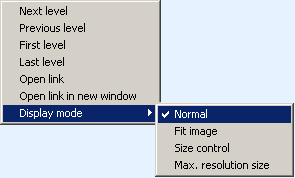
The menu can be disabled
or enabled using the EnableContextMenu
property.
Currently the control provides
the following keyboard shortcuts:
|
Shortcut |
Description |
|
Ctrl + -> (Control
and Right Arrow) |
Go to next level |
|
Ctrl + <- (Control
and Left Arrow) |
Go to previous level |
|
Ctrl + Home (Control
and Home) |
Go to first level (smallest) |
|
Ctrl + End (Control
and End) |
Go to last level (largest) |
|
Left arrow |
Scroll left |
|
Right arrow |
Scroll right |
|
Up arrow |
Scroll up |
|
Down arrow |
Scroll down |
|
+ (Add) |
Zoom in. The control
will keep zooming in until the button is release, then the image will
be updated (clarified with new level info) |
|
- (Subtract) |
Zoom out. The control
will keep zooming out until the button is release, then the image will
be updated (clarified with new level info) |
The keyboard shortcuts can
be disabled or enabled using the EnableKeyboardControl
property.
HTML Image tags substitution:
The following table shows how to replace
an existing IMG HTML object with the LEADTOOLS JPEG2000 COM Object:
|
Replace This: |
|
|
With This: |
|